# StackPanel

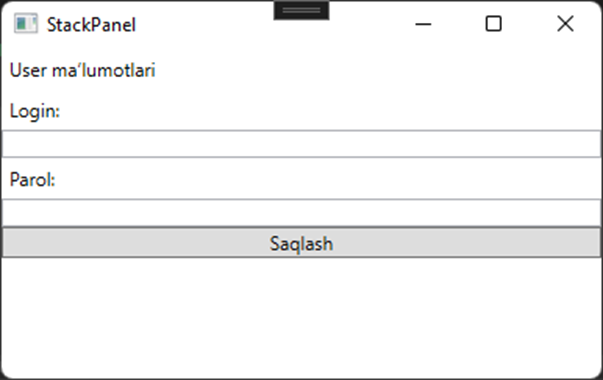
StackPanel - eng oddiy konpanovka konteynerlaridan biri. U bolalarini(children) bitta ustun yoki bitta qator qilib joylashtiradi. Misol uchun, quyidagi oynani ko‘ramiz:

```csharp
<Window
    x:Class="Test.Window1"
    xmlns="http://schemas.microsoft.com/winfx/2006/xaml/presentation"
    xmlns:x="http://schemas.microsoft.com/winfx/2006/xaml"
    Title="StackPanel"
    Width="400"
    Height="250">
    <Window.Resources />
    <StackPanel>
        <Label>User ma’lumotlari</Label>
        <Label>Login:</Label>
        <TextBox></TextBox>
        <Label>Parol:</Label>
        <TextBox></TextBox>
        <Button>Saqlash</Button>
    </StackPanel>
    
</Window>
```

![](https://user-images.githubusercontent.com/91861166/220124438-7ad2dbd3-9b69-47b4-ae75-170250ba5bab.png)

Oddiy holda StackPanel ichidagi elementlarni tepadan pasga qarab joylashtiradi. Yuqoridagi misolda ko’rishimiz mumkunki, StackPanel elementlarni bo’yini minimum berib tepadan pasga qarab joylashtirgan, elementlarni eniga bo’lsa o’zini to’ldirguncha cho’zgan.

StackPanelning **Orientation** nomli xususiyatini o’zgartirish orqali elementlarni gorizontal joylashtirish mumkin. Bu holda esa elementlar eni minimum eni esa maximum bo’ladi:

```csharp
<StackPanel Orientation="Horizontal">
```

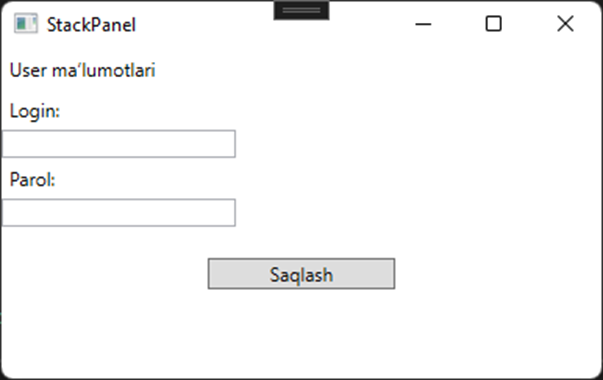
StackPanel konteyner bo’lgani bilan ichidagi elementlar ham o’z so’zini ayta oladi. Ichki elementlarni o’ziga xos xususiyatlarini o’zgartirish orqali ularni StackPanel ichida joylashuvini boshqarsa bo’ladi:
![](https://user-images.githubusercontent.com/91861166/220124578-d8cbcf77-3fac-4366-bda5-8afcdd7cede1.png)


---

# Agent Instructions: Querying This Documentation

If you need additional information that is not directly available in this page, you can query the documentation dynamically by asking a question.

Perform an HTTP GET request on the current page URL with the `ask` query parameter:

```
GET https://docs.dot-net.uz/c-.net/desktop/wpf-windows-presentation-foundation-1/wpf-ilovasini-tuzish/stackpanel.md?ask=<question>
```

The question should be specific, self-contained, and written in natural language.
The response will contain a direct answer to the question and relevant excerpts and sources from the documentation.

Use this mechanism when the answer is not explicitly present in the current page, you need clarification or additional context, or you want to retrieve related documentation sections.